


Bank account basics
Looking for your account number?
While account numbers and your Member number look similar, they each serve a different purpose. It's important to understand that when banking online, your account numbers are key to a smooth payment or transfer process.


What is a Member number?
Your Member number is like your Bank First ID. It helps us identify you and allows you to log in to Internet Banking and the Bank First App.
Here's where you can find your Member number:
Your bank statements.
The back of your Visa Debit Card.
Transferring money
Provide your account number for incoming transfers and deposits, setting up direct debits, receiving salary payments or transferring money between financial institutions.
Using your Member number or product identifier may result in:
Declined transactions
Delayed payments
Failed direct debits or credits
What is a BSB?
Every bank has a BSB (Bank-State-Branch) number and they're all different.
At Bank First we have one universal BSB to remember - 704191. You can find our BSB just under your account name in Internet Banking or the Bank First App.
What is an Account number?
Every account you have with Bank First has a unique 9-digit account number.
This is the number you use to receive money into your specific Bank First account. You can find your account number just under your account name in Internet Banking or the Bank First App.
To pay or transfer money to someone else, you'll need their BSB and account number. Other people can transfer money to you by using your account details.
You can also use your mobile phone number or email address to transfer money with PayID®.
What is a SWIFT code?
A Society for Worldwide Interbank Financial Telecommunication (SWIFT) code is an international code that identifies banks all over the world.
Bank First does not have a SWIFT code as we utilise our foreign exchange partner Convera, to process international funds transfers.
You can receive money in a foreign currency into your Bank First account. We will convert the incoming money into Australian dollars (AUD) before it hits your account. It's simple!
Receiving money from overseas
Visit our foreign exchange partner, Convera's portal and complete the online form. Once completed, send the details from the portal to your overseas payer and we will handle the rest.
Frequently asked questions
Your Member number is like your Bank First ID. It helps us identify you and allows you to log in to Internet Banking and the Bank First App.
The S-number or I or L number is an internal code that we use to identify what type of account we are referencing. It isn't a number that you can use outside Bank First. So while we all know what you are talking about when you say 'S1', other banks and payees won't recognise this.
We removed your Member number and S/I/L-number from the accounts screen to make it easier to find the information you need to receive money into your Bank First account.
You can find your Member Number in several ways:
Your bank statements
At the back of your Visa Debit Card
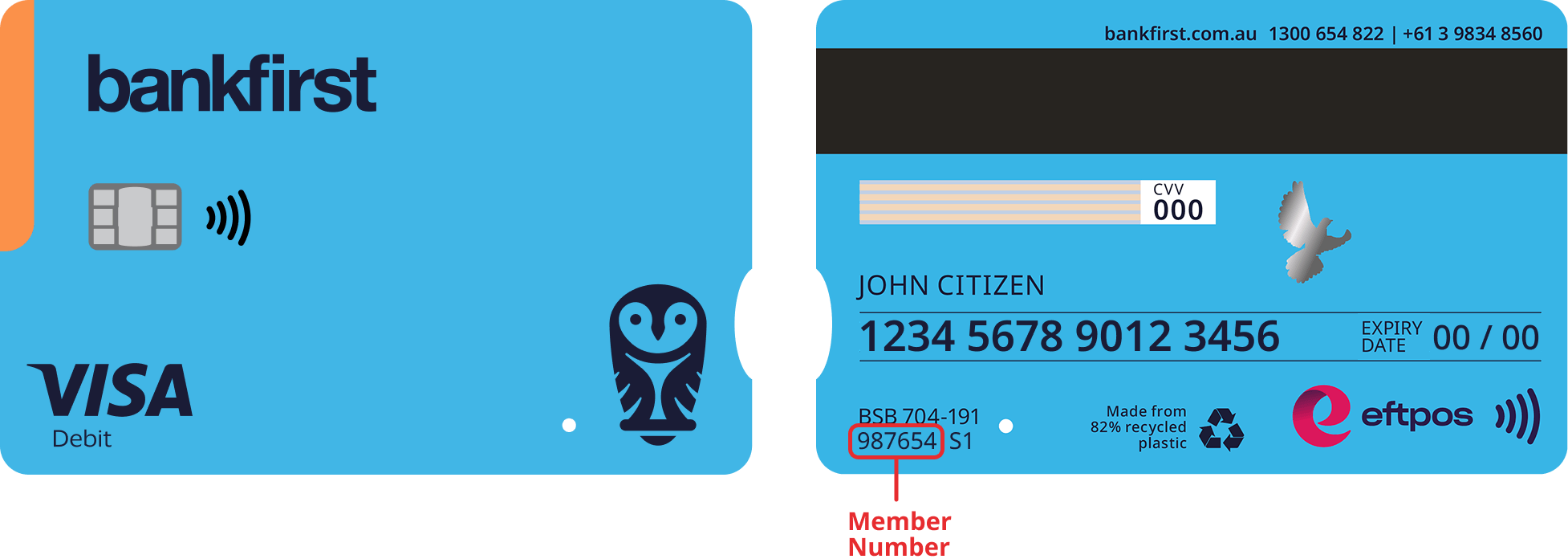
Every bank has a BSB (Bank-State-Branch) number and they're all different. At Bank First we have one universal BSB to remember - 704191.
Every account you have with Bank First has a unique 9-digit account number. This is the number that you can use to receive money into your specific Bank First account.
A common mistake is to use your Member number followed by the S-number instead of your account number.
You can make your banking simpler by giving each of your account a nickname in Internet Banking.
For example, if one of your accounts is a Kids Account for Jenny, you can change the nick name of that account to Jenny. This does not change the name the account is held in, it is simply a nickname you’ll see on Internet Banking and the Bank First App.
Learn more about renaming your accounts in Internet Banking.
No you don't. Your direct debits and credits will continue to be processed using your member number.
You can still continue to use your Member number for new and existing payments. The 9-digit account number is another transfer option and allows you to directly credit or debit any of your accounts.
Before we brought in unique account numbers for each account, our Members were able to use their Member number as an account number. This allowed all incoming transfers using a Member number to go directly into your S1 or main transaction account.
Using account numbers allows you to receive payments directly into different accounts, not just the S1, so you are able to effectively manage incoming transfers.
